


卢森堡
模块
以下模块会随卢森堡本地化版本自动安装:
名称 |
技术名称 |
描述 |
|---|---|---|
卢森堡—会计 |
|
默认:ref: |
卢森堡—会计报告 |
|
特定国家/地区报告 |
注解
在某些情况下,例如升级到带有附加模块的版本时,模块可能不会自动安装。任何缺失的模块都可以手动 installed。
本地化概述
卢森堡本地化包括以下功能:
科目表:遵循当前官方会计标准的一组预定义帐户 (PCN 2020)
税:预先配置的税率,包括标准税率 (17%)、降低税率(14%、8% 和 3%)和零税率增值税、共同体内税率和零税率出口税
财政状况(税项和科目映射):根据客户或供应商自动进行账户和税务调整
电子发票:使用 Peppol 电子发票
税务报告:您的增值税责任的详细概述,以及生成 XML 格式的月度和年度增值税申报表以上传到 eCDF platform
FAIA审核文件导出:以 :abbr:`FAIA (Fichier d’Audit Informatisé AED)`(卢森堡 SAF-T)格式生成审核文件
税
默认情况下,卢森堡本地化包提供以下 taxes:
标准增值税 (17%):适用于卢森堡境内的大多数商品和服务
降低增值税(14%、8% 和 3%):适用于卢森堡境内的某些商品和服务
零税率增值税:适用于无需缴纳增值税的商品和服务
社区内增值税:适用于向位于其他欧盟国家的增值税注册人员出售或购买的商品和服务
出口税(0%):对卢森堡境外出口的商品和服务实行零税率
电子发票
卢森堡的 Odoo 用户可以在 Peppol 网络上注册,该网络允许与网络上的其他参与者交换电子发票和贷方票据。
卢森堡的电子发票格式为**BIS Billing 3.0**。
重要
卢森堡的所有 B2G 交易都必须通过 Peppol 开具电子发票。
税务报告
在卢森堡,公司必须根据其营业额每月、每季度或每年向税务局提交增值税申报表。提交月度或季度申报的公司还需要提交年度申报。
月度/季度和年度增值税申报均可导出为 XML 文件以上传到 eCDF platform。
月度/季度申报
转到:menuselection:Accounting --> Reporting --> Tax Report。
在 Report 选择器中,选择 Tax Report (LU)。
在 (Period) 选择器中,选择要生成声明的月份或季度。
检查报告所有四个部分生成的金额。
如果您在此期间向享受中小企业增值税免税的客户进行销售,则需要在第 I 部分第 481 和 482 项的可编辑字段中手动输入此类销售的价值。要查找这些项目的金额,您可以使用 Partner Ledger 报告:
转到:menuselection:
Accounting --> Reporting --> Partner Ledger。在 (Period) 选择器中,选择适当的月份或季度。
在 (Account) 选择器中,选择 Receivable。
在 (Partners) 选择器中,选择属于豁免范围的合作伙伴。
复制给定期间这些合作伙伴的总计 Balance。
声明正确后,单击 (action menu) 图标,然后单击 XML 以 XML 格式导出并下载。然后您可以在 eCDF 平台上提交 XML 文件。
年度申报
账户标签配置
以下配置允许根据影响与每个报告行关联的科目的日记帐分录,自动为报告的第 I 部分和第 III 部分以及附录 A 生成值。
这需要为每种需要缴纳增值税、销项税和进项税以及这些部分中列出的费用的运营类型使用不同的 account。
将以下帐户 tags 分配给您用于每种类型的操作(需缴纳声明中列出的增值税)的帐户(如果适用):
001 - Supply of inhouse manufactured goods002 - Supply of goods not manufactured inhouse003 - Net profit margin004 - Supply of services005 - Disposal of tangible and intangible capital assets008 - Application of goods for private use or for that of the staff009 - Application for the purpose of business of goods010 - Use of goods considered business assets011 - Supply of services carried out free of charge013 - IC supply of goods202 - IC supply of new means of transport203 - Supply of goods carried out abroad
将以下科目标签分配给您用于每种类型的销项税和进项增值税的科目(如果适用):
077 - VAT on stock entries invoiced by other taxable persons081 - VAT on capital expenditures invoiced by other taxable persons085 - VAT on operational expenditures invoiced by other taxable persons078 - VAT on stock entries due in respect of IC acquisitions082 - VAT on capital expenditures due in respect of IC acquisitions086 - VAT on operational expenditures due in respect of IC acquisitions079 - VAT on stock entries of importations of goods083 - VAT on capital expenditures of importations of goods087 - VAT on operational expenditures of importations of goods404 - VAT on stock entries due under the reverse charge405 - VAT on capital expenditures due under the reverse charge406 - VAT on operational expenditures due under the reverse charge
将以下帐户标签分配给您用于每种类型费用的费用帐户(如果适用):
188 - Appendix A - Expenses for other work carried out by third parties190 - Appendix A - Car expenses239 - Appendix A - Gross salaries244 - Appendix A - Gross wages247 - Appendix A - Occasional salaries250 - Appendix A - Compulsory social security contributions (employer's share)253 - Appendix A - Accident insurance260 - Appendix A - Staff travel and representation expenses269 - Appendix A - Accounting and bookkeeping fees283 - Appendix A - Employer's travel and representation expenses285 - Appendix A - Electricity289 - Appendix A - Gas293 - Appendix A - Employer's travel and representation expenses301 - Appendix A - Telecommunications305 - Appendix A - Renting/leasing of immovable property with application of VAT307 - Appendix A - Renting/leasing of immovable property with no application of VAT310 - Appendix A - Renting/leasing of permanently installed equipment and machinery316 - Appendix A - Property tax324 - Appendix A - Business tax326 - Appendix A - Interest paid for long-term debts327 - Appendix A - Interest paid for short-term debts328 - Appendix A - Other financial costs330 - Appendix A - Stock and business equipment insurance331 - Appendix A - Public and professional third party liability insurance332 - Appendix A - Office expenses336 - Appendix A - Fees and subscriptions paid to professional associations and learned societies337 - Appendix A - Papers and periodicals for business purposes343 - Appendix A - Shipping and transport expenses345 - Appendix A - Work clothes347 - Appendix A - Advertising and publicity349 - Appendix A - Packaging351 - Appendix A - Repair and maintenance of equipment and machinery353 - Appendix A - Other repairs355 - Appendix A - New acquisitions (tools and equipment) if their cost can be fully allocated to the year of acquisition or creation358 - Appendix A - Custom (value)361 - Appendix A - Total 'Appendix to Operational expenditures'
开启声明
转到:menuselection:Accounting --> Reporting --> Tax Report。
在 Report 选择器中,选择 Annual VAT Declaration (LU)。
在 (Period) 选择器中,选择要生成声明的会计年度日期。
完成申报
年度申报表包含标有 I 至 V 的五个部分、标有 A 至 G 的七个附录以及运营支出的附加附录。
第 I、III 节和附录 A 可以根据 account tag configuration 自动预先填充。配置帐户标签后,set the tax lock date 到会计年度结束。这将触发这些值的预计算。
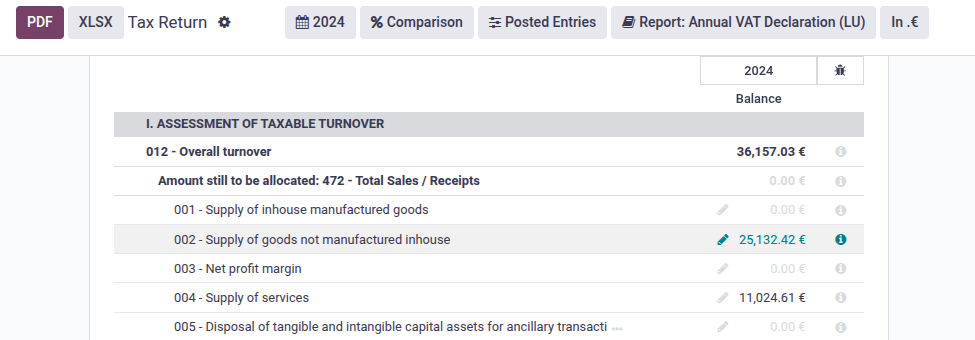
或者,可以在第一部分和第三部分中的各个报告行之间手动分配当年的增值税借方和贷方总额。您可以使用 (Edit) 图标手动输入每个报告行的值。
第 II 部分和第 IV 部分是自动计算的。
然后,您需要手动填写附录 B 至 G,以及运营支出附录,并报告任何其他信息。
导出报关单
声明完整且正确后,单击 (action menu) 图标,然后单击 XML 以 XML 格式导出并下载。然后您可以在 eCDF 平台上提交 XML 文件。
其他资料
“<http://www.ecdf.lu>电子收集财务数据(eCDF)平台”_
FAIA审核文件导出
FAIA 是用于会计数据交换的 SAF-T 格式的卢森堡版本。它允许将一段时间内完整的会计数据从纳税人的会计系统导出到税务局。
Odoo 可以生成 FAIA 格式的 XML 文件,其中包含一段时间内的全部会计数据。
要生成并下载 FAIA 文件,请打开 ,选择所需的期间,单击 (action menu) 图标,然后单击 Export FAIA。