


第 13 章:与其他模块交互
在:doc:`previous chapter <12_inheritance>`中,我们使用继承来修改模块的行为。在我们的房地产场景中,我们希望更进一步,能够为我们的客户生成发票。 Odoo 提供了一个发票模块,因此直接从我们的房地产模块创建发票会很方便,即一旦将属性设置为“已售出”,就会在发票应用程序中创建发票。
具体示例:账户转移
注解
目标:在本节末尾:
应创建一个新模块“
estate_account”出售房产时,应为买方开具发票
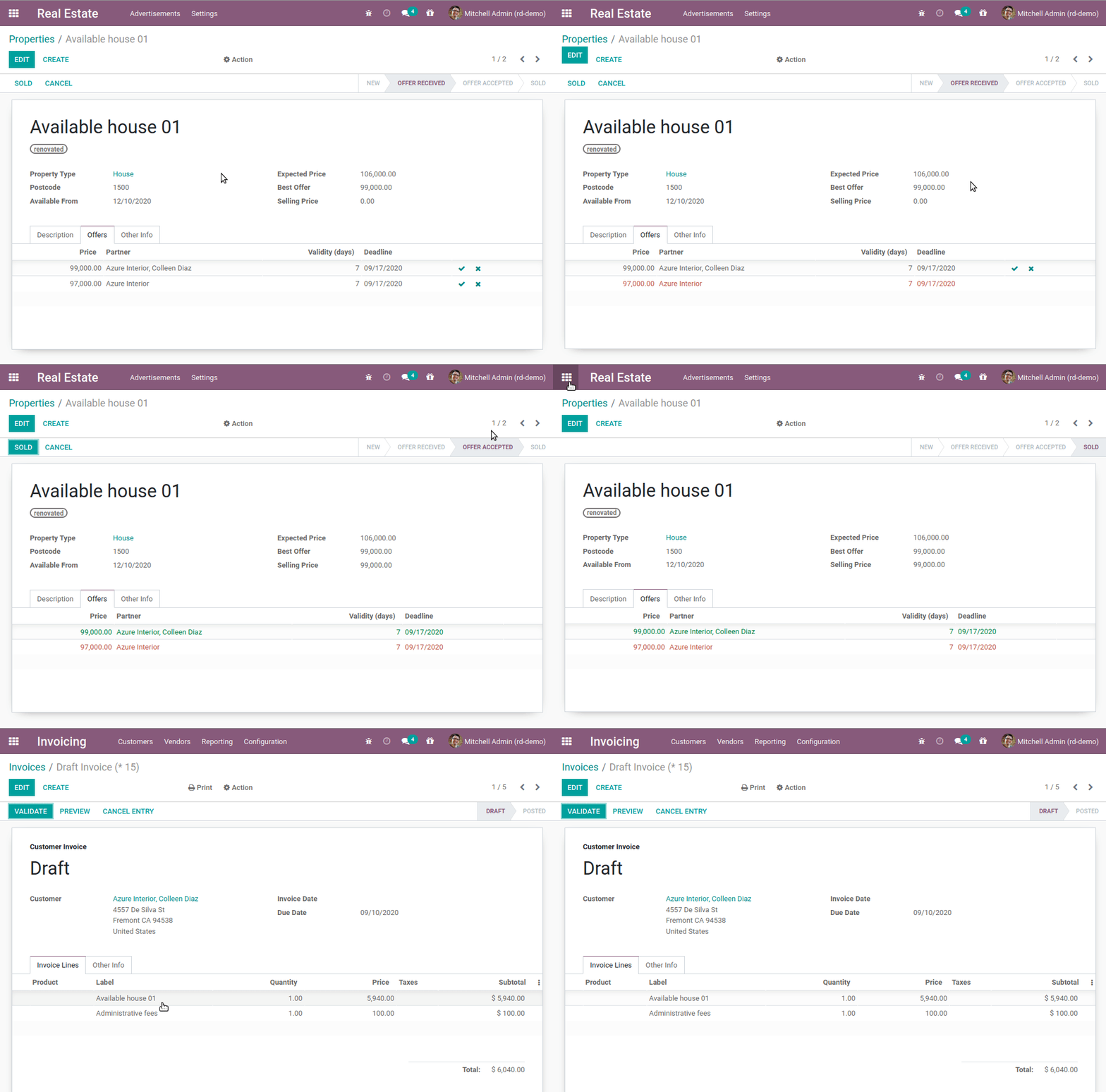
任何时候我们与另一个模块交互时,我们都需要牢记模块化。如果我们打算将我们的应用程序出售给房地产机构,有些人可能需要发票功能,但其他人可能不想要。
链接模块
此类用例的常见方法是创建一个“链接”模块。在我们的例子中,该模块将依赖于“estate` and ``account`”,并将包括房地产的发票创建逻辑。这样,房地产和会计模块就可以独立安装。当两者都安装时,链接模块提供新功能。
Exercise
创建链接模块。
创建“estate_account` module, which depends on the estate and ``account`”模块。目前,它只是一个空壳。
提示:您已在 beginning of the tutorial 执行此操作。这个过程非常相似。
当“estate_account”模块出现在列表中时,继续安装它!您会注意到发票应用程序也已安装。这是预期的,因为您的模块依赖于它。如果您卸载发票应用程序,您的模块也将被卸载。
发票创建
现在是生成发票的时候了。我们想要向“estate.property”模型添加功能,即我们想要在出售房产时添加一些额外的逻辑。这听起来很熟悉吗?如果没有,最好返回 previous chapter,因为您可能错过了某些内容;-)
第一步,我们需要扩展在属性上按下 ‘Sold’ button 时调用的操作。为此,我们需要在 estate_account 模块中为“estate.property` model. For now, the overridden action will simply return the ``super`”调用创建一个 model inheritance。也许一个例子会让事情变得更清楚::
from odoo import models

class InheritedModel(models.Model):
    _inherit = ["inherited.model"]

    def inherited_action(self):
        return super().inherited_action()
可以找到一个实际示例 here。
Exercise
添加发票创建的第一步。
创建一个“
estate_property.py`file in the correct folder of the ``estate_account`”模块。_inherittheestate.property模型。覆盖``action_sold`` method (you might have named it differently) to return the ``super``调用。
提示:为了确保其正常工作,请在重写的方法中添加“print”或调试器断点。
有效吗?如果没有,也许检查所有 Python 文件是否都正确导入。
如果覆盖有效,我们可以继续并创建发票。不幸的是,没有简单的方法可以知道如何在 Odoo 中创建任何给定的对象。大多数时候,有必要查看其模型以找到所需的字段并提供适当的值。
一个好的学习方法是查看其他模块如何完成您想做的事情。例如,销售的基本流程之一是根据销售订单创建发票。这看起来是一个很好的起点,因为它正是我们想要做的。花一些时间阅读并理解 _create_invoices 方法。当您因这个简单的任务看起来非常复杂而哭泣时,我们可以继续本教程。
要创建发票,我们需要以下信息:
a
partner_id:客户move_type: it has several ` 可能值 <https://github.com/odoo/odoo/blob/f1f48cdaab3dd7847e8546ad9887f24a9e2ed4c1/addons/account/models/account_move.py#L138-L147>`__a
journal_id:会计日记帐
这足以创建一张空发票。
Exercise
添加发票创建的第二步。
创建一个空的 account.move in the override of the action_sold 方法:
partner_idis taken from the currentestate.propertymove_type应对应于“客户发票”
尖端:
要创建对象,请使用``self.env[model_name].create(values)``, where
valuesis adict。create方法不接受记录集作为字段值。
当属性设置为“已售出”时,您现在应该在发票/客户/发票中创建新的客户发票。
显然,到目前为止我们还没有任何发票行。要创建发票行,我们需要以下信息:
name:该行的描述quantityprice_unit
此外,发票行需要链接到发票。将行链接到发票的最简单、最有效的方法是在创建发票时包含所有行。为此,需要使用 invoice_line_ids field is included in the account.move creation, which is a One2many. One2many and Many2many use special ‘commands’ which have been made human readable with the Command namespace. This namespace represents a triplet command to execute on a set of records. The triplet was originally the only option to do these commands, but it is now standard to use the namespace instead. The format is to place them in a list which is executed sequentially. Here is a simple example to include a One2many field line_ids at creation of a test_model:
from odoo import Command

def inherited_action(self):
    self.env["test_model"].create(
        {
            "name": "Test",
            "line_ids": [
                Command.create({
                    "field_1": "value_1",
                    "field_2": "value_2",
                })
            ],
        }
    )
    return super().inherited_action()
Exercise
添加发票创建的第三步。
在创建“account.move”期间添加两个发票行。每件出售的房产将按照以下条件开具发票:
售价的6%
额外 100.00 行政费
提示:添加 invoice_line_ids at creation following the example above. For each line, we need a name, quantity and price_unit。
本章可能是迄今为止最困难的章节之一,但它是最接近 Odoo 开发实际情况的。在:doc:`next chapter <14_qwebintro>`中,我们将介绍Odoo中使用的模板机制。