


外部 RPC API
危险
19.0 版后已移除.
端点“/xmlrpc`, /xmlrpc/2 and ``/jsonrpc`”处的 XML-RPC 和 JSON-RPC API 计划在 Odoo 22(2028 年秋季)和 Online 21.1(2027 年冬季)中删除。 外部 JSON-2 API 充当替代品。
其他控制器 @route(type='jsonrpc') (known until Odoo 18 as type='json') 不受此弃用通知的约束。
Odoo 通常通过模块进行内部扩展,但它的许多功能和所有数据也可以从外部进行外部分析或与各种工具集成。 型号 API 的一部分可以通过 XML-RPC 轻松获得,并且可以通过多种语言进行访问。
从 PHP8 开始,XML-RPC 扩展默认情况下可能不可用。查看 manual 了解安装步骤。
仅*自定义* Odoo 定价计划可通过外部 API 访问数据。 One App Free 或 Standard 计划无法访问外部 API。如需了解更多信息,请访问 Odoo pricing page 或联系您的客户成功经理。
联系
配置
如果您已经安装了 Odoo 服务器,则只需使用其参数即可。
重要
对于 Odoo Online 实例 (<domain>.odoo.com),创建用户时无需*本地*密码(作为通过 Odoo Online 身份验证系统登录的用户,而不是通过实例本身登录)。要在 Odoo Online 实例上使用 XML-RPC,您需要为要使用的用户帐户设置密码:
使用管理员帐户登录您的实例。
转到:menuselection:
Settings --> Users & Companies --> Users。单击要用于 XML-RPC 访问的用户。
单击 Action 并选择 Change Password。
设置 New Password 值,然后单击 Change Password。
服务器 url 是实例的域(例如 https://mycompany.odoo.com),数据库名称 是实例的名称(例如 mycompany)。 *用户名*是配置的用户登录名,如*更改密码*屏幕所示。
url = <insert server URL>
db = <insert database name>
username = 'admin'
password = <insert password for your admin user (default: admin)>
url = <insert server URL>
db = <insert database name>
username = "admin"
password = <insert password for your admin user (default: admin)>
$url = <insert server URL>;
$db = <insert database name>;
$username = "admin";
$password = <insert password for your admin user (default: admin)>;
final String url = <insert server URL>,
              db = <insert database name>,
        username = "admin",
        password = <insert password for your admin user (default: admin)>;
var (
    url = <insert server URL>
    db = <insert database name>
    username = "admin"
    password = <insert password for your admin user (default: admin)>
)
API 密钥
14.0 新版功能.
Odoo 支持 api 密钥,并且(取决于模块或设置)可能**需要**这些密钥来执行 Web 服务操作。
在脚本中使用 API 密钥的方法是简单地将您的 密码 替换为密钥。登录仍在使用中。您应该像存储密码一样仔细存储 API 密钥,因为它们本质上提供对您的用户帐户的相同访问权限(尽管它们不能用于通过界面登录)。
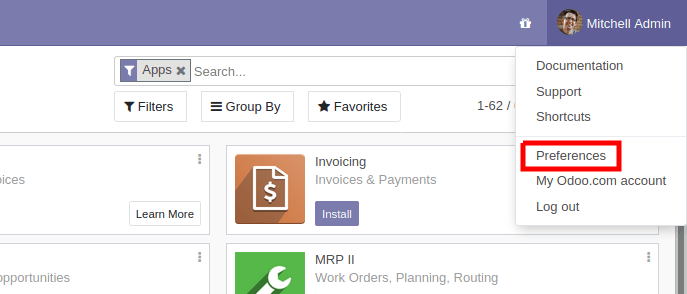
要向您的帐户添加密钥,只需转到您的 Preferences`(或 :guilabel:`My Profile):
然后打开 Account Security 选项卡,然后单击 New API Key:
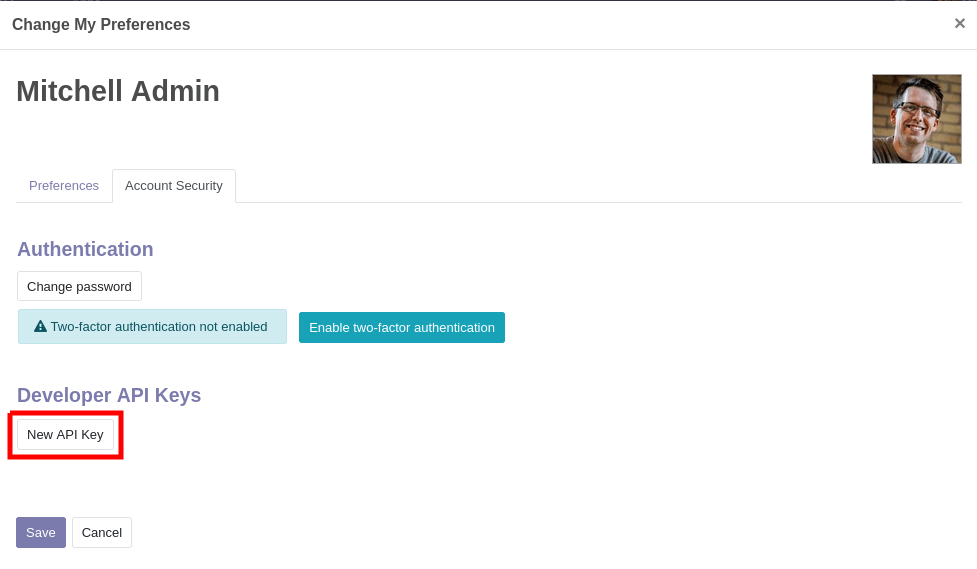
输入密钥的描述,此描述应尽可能清晰和完整:这是您稍后识别密钥并知道是否应该删除它们或保留它们的唯一方法。
单击 Generate Key,然后复制提供的密钥。 小心保存此密钥:它相当于您的密码,就像您的密码一样,系统稍后将无法再次检索或显示该密钥。如果您丢失了该密钥,则必须创建一个新密钥(并且可能会删除丢失的密钥)。
在您的帐户中配置密钥后,它们将显示在 New API Key 按钮上方,您将能够删除它们:
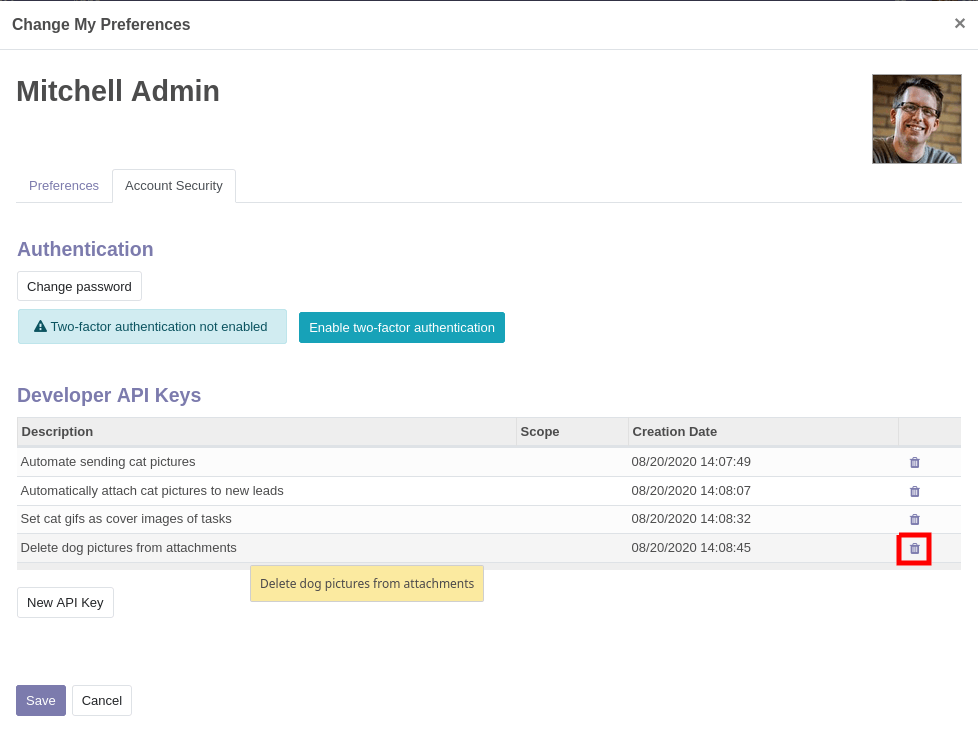
已删除的 API 密钥无法恢复删除或重新设置。您将必须生成一个新密钥并更新所有使用旧密钥的地方。
测试数据库
为了让探索更简单,您还可以向 https://demo.odoo.com 请求测试数据库:
import xmlrpc.client
info = xmlrpc.client.ServerProxy('https://demo.odoo.com/start').start()
url, db, username, password = info['host'], info['database'], info['user'], info['password']
require "xmlrpc/client"
info = XMLRPC::Client.new2('https://demo.odoo.com/start').call('start')
url, db, username, password = info['host'], info['database'], info['user'], info['password']
require_once('ripcord.php');
$info = ripcord::client('https://demo.odoo.com/start')->start();
list($url, $db, $username, $password) = array($info['host'], $info['database'], $info['user'], $info['password']);
注解
这些示例使用 Ripcord 库,它提供了一个简单的 XML-RPC API。 Ripcord 要求 PHP 安装中包含 XML-RPC support be enabled。
由于调用是通过 HTTPS 执行的,因此还需要启用 OpenSSL extension。
final XmlRpcClient client = new XmlRpcClient();

final XmlRpcClientConfigImpl start_config = new XmlRpcClientConfigImpl();
start_config.setServerURL(new URL("https://demo.odoo.com/start"));
final Map<String, String> info = (Map<String, String>)client.execute(
    start_config, "start", emptyList());

final String url = info.get("host"),
              db = info.get("database"),
        username = info.get("user"),
        password = info.get("password");
client, err := xmlrpc.NewClient("https://demo.odoo.com/start", nil)
if err != nil {
    log.Fatal(err)
}
info := map[string]string{}
client.Call("start", nil, &info)
url = info["host"].(string)
db = info["database"].(string)
username = info["user"].(string)
password = info["password"].(string)
正在登录
Odoo 要求 API 用户在查询大多数数据之前先进行身份验证。
在经过身份验证的调用中使用“xmlrpc/2/common` endpoint provides meta-calls which don’t require authentication, such as the authentication itself or fetching version information. To verify if the connection information is correct before trying to authenticate, the simplest call is to ask for the server’s version. The authentication itself is done through the authenticate function and returns a user identifier (``uid`”,而不是登录。
common = xmlrpc.client.ServerProxy('{}/xmlrpc/2/common'.format(url))
common.version()
common = XMLRPC::Client.new2("#{url}/xmlrpc/2/common")
common.call('version')
$common = ripcord::client("$url/xmlrpc/2/common");
$common->version();
final XmlRpcClientConfigImpl common_config = new XmlRpcClientConfigImpl();
common_config.setServerURL(new URL(String.format("%s/xmlrpc/2/common", url)));
client.execute(common_config, "version", emptyList());
client, err := xmlrpc.NewClient(fmt.Sprintf("%s/xmlrpc/2/common", url), nil)
if err != nil {
    log.Fatal(err)
}
common := map[string]any{}
if err := client.Call("version", nil, &common); err != nil {
    log.Fatal(err)
}
结果:
{
    "server_version": "13.0",
    "server_version_info": [13, 0, 0, "final", 0],
    "server_serie": "13.0",
    "protocol_version": 1,
}
uid = common.authenticate(db, username, password, {})
uid = common.call('authenticate', db, username, password, {})
$uid = $common->authenticate($db, $username, $password, array());
int uid = (int)client.execute(common_config, "authenticate", asList(db, username, password, emptyMap()));
var uid int64
if err := client.Call("authenticate", []any{
    db, username, password,
    map[string]any{},
}, &uid); err != nil {
    log.Fatal(err)
}
调用方法
第二个端点是 xmlrpc/2/object. It is used to call methods of odoo models via the execute_kw RPC 函数。
每次调用“execute_kw”都采用以下参数:
要使用的数据库,一个字符串
用户 ID(通过
authenticate检索),一个整数用户的密码,一个字符串
型号名称,字符串
方法名称,字符串
按位置传递的参数数组/列表
通过关键字传递的参数映射/字典(可选)
Example
例如,要搜索通过关键字传递的``res.partner`` model, we can call name_search with name passed by position and ``limit``中的记录(以获得最多10条结果):
models = xmlrpc.client.ServerProxy('{}/xmlrpc/2/object'.format(url))
models.execute_kw(db, uid, password, 'res.partner', 'name_search', ['foo'], {'limit': 10})
models = XMLRPC::Client.new2("#{url}/xmlrpc/2/object").proxy
models.execute_kw(db, uid, password, 'res.partner', 'name_search', ['foo'], {limit: 10})
$models = ripcord::client("$url/xmlrpc/2/object");
$models->execute_kw($db, $uid, $password, 'res.partner', 'name_search', array('foo'), array('limit' => 10));
final XmlRpcClient models = new XmlRpcClient() {{
    setConfig(new XmlRpcClientConfigImpl() {{
        setServerURL(new URL(String.format("%s/xmlrpc/2/object", url)));
    }});
}};
models.execute("execute_kw", asList(
    db, uid, password,
    "res.partner", "name_search",
    asList("foo"),
    new HashMap() {{ put("limit", 10); }}
));
models, err := xmlrpc.NewClient(fmt.Sprintf("%s/xmlrpc/2/object", url), nil)
if err != nil {
    log.Fatal(err)
}
var result bool
if err := models.Call("execute_kw", []any{
    db, uid, password,
    "res.partner", "name_search",
    []string{"foo"},
    map[string]bool{"limit": 10},
}, &result); err != nil {
    log.Fatal(err)
}
结果:
true
列出记录
可以通过 search() 列出和过滤记录。
search() 采用强制的 domain 过滤器(可能为空),并返回与过滤器匹配的所有记录的数据库标识符。
Example
列出客户公司,例如:
models.execute_kw(db, uid, password, 'res.partner', 'search', [[['is_company', '=', True]]])
models.execute_kw(db, uid, password, 'res.partner', 'search', [[['is_company', '=', true]]])
$models->execute_kw($db, $uid, $password, 'res.partner', 'search', array(array(array('is_company', '=', true))));
asList((Object[])models.execute("execute_kw", asList(
    db, uid, password,
    "res.partner", "search",
    asList(asList(
        asList("is_company", "=", true)))
)));
var records []int64
if err := models.Call("execute_kw", []any{
    db, uid, password,
    "res.partner", "search",
    []any{[]any{
        []any{"is_company", "=", true},
    }},
}, &records); err != nil {
    log.Fatal(err)
}
结果:
[7, 18, 12, 14, 17, 19, 8, 31, 26, 16, 13, 20, 30, 22, 29, 15, 23, 28, 74]
分页
默认情况下,搜索将返回与条件匹配的所有记录的 id,这可能是一个巨大的数字。 offset and limit 参数可用于仅检索所有匹配记录的子集。
Example
models.execute_kw(db, uid, password, 'res.partner', 'search', [[['is_company', '=', True]]], {'offset': 10, 'limit': 5})
models.execute_kw(db, uid, password, 'res.partner', 'search', [[['is_company', '=', true]]], {offset: 10, limit: 5})
$models->execute_kw($db, $uid, $password, 'res.partner', 'search', array(array(array('is_company', '=', true))), array('offset'=>10, 'limit'=>5));
asList((Object[])models.execute("execute_kw", asList(
    db, uid, password,
    "res.partner", "search",
    asList(asList(
        asList("is_company", "=", true))),
    new HashMap() {{ put("offset", 10); put("limit", 5); }}
)));
var records []int64
if err := models.Call("execute_kw", []any{
    db, uid, password,
    "res.partner", "search",
    []any{[]any{
        []any{"is_company", "=", true},
    }},
    map[string]int64{"offset": 10, "limit":  5},
}, &records); err != nil {
    log.Fatal(err)
}
结果:
[13, 20, 30, 22, 29]
计数记录
search_count() 可用于仅检索与查询匹配的记录数,而不是检索可能庞大的记录列表并对其进行计数。它采用与 search() 相同的 domain 过滤器,并且没有其他参数。
Example
models.execute_kw(db, uid, password, 'res.partner', 'search_count', [[['is_company', '=', True]]])
models.execute_kw(db, uid, password, 'res.partner', 'search_count', [[['is_company', '=', true]]])
$models->execute_kw($db, $uid, $password, 'res.partner', 'search_count', array(array(array('is_company', '=', true))));
(Integer)models.execute("execute_kw", asList(
    db, uid, password,
    "res.partner", "search_count",
    asList(asList(
        asList("is_company", "=", true)))
));
var counter int64
if err := models.Call("execute_kw", []any{
    db, uid, password,
    "res.partner", "search_count",
    []any{[]any{
        []any{"is_company", "=", true},
    }},
}, &counter); err != nil {
    log.Fatal(err)
}
结果:
19
注解
如果其他用户正在使用服务器,则调用“search` then ``search_count`”(或其他方式)可能不会产生一致的结果:存储的数据可能在调用之间发生了变化。
读取记录
记录数据可通过 read() 方法访问,该方法采用 id 列表(由 search() 返回),以及可选的要获取的字段列表。默认情况下,它会获取当前用户可以读取的所有字段,这往往是一个巨大的数量。
Example
ids = models.execute_kw(db, uid, password, 'res.partner', 'search', [[['is_company', '=', True]]], {'limit': 1})
[record] = models.execute_kw(db, uid, password, 'res.partner', 'read', [ids])
# count the number of fields fetched by default
len(record)
ids = models.execute_kw(db, uid, password, 'res.partner', 'search', [[['is_company', '=', true]]], {limit: 1})
record = models.execute_kw(db, uid, password, 'res.partner', 'read', [ids]).first
# count the number of fields fetched by default
record.length
$ids = $models->execute_kw($db, $uid, $password, 'res.partner', 'search', array(array(array('is_company', '=', true))), array('limit'=>1));
$records = $models->execute_kw($db, $uid, $password, 'res.partner', 'read', array($ids));
// count the number of fields fetched by default
count($records[0]);
final List ids = asList((Object[])models.execute(
    "execute_kw", asList(
        db, uid, password,
        "res.partner", "search",
        asList(asList(
            asList("is_company", "=", true))),
        new HashMap() {{ put("limit", 1); }})));
final Map record = (Map)((Object[])models.execute(
    "execute_kw", asList(
        db, uid, password,
        "res.partner", "read",
        asList(ids)
    )
))[0];
// count the number of fields fetched by default
record.size();
var ids []int64
if err := models.Call("execute_kw", []any{
    db, uid, password,
    "res.partner", "search",
    []any{[]any{
        []any{"is_company", "=", true},
    }},
    map[string]int64{"limit": 1},
}, &ids); err != nil {
    log.Fatal(err)
}
var records []any
if err := models.Call("execute_kw", []any{
    db, uid, password,
    "res.partner", "read",
    ids,
}, &records); err != nil {
    log.Fatal(err)
}
// count the number of fields fetched by default
count := len(records)
结果:
121
相反,只选择三个被认为有趣的领域。
models.execute_kw(db, uid, password, 'res.partner', 'read', [ids], {'fields': ['name', 'country_id', 'comment']})
models.execute_kw(db, uid, password, 'res.partner', 'read', [ids], {fields: %w(name country_id comment)})
$models->execute_kw($db, $uid, $password, 'res.partner', 'read', array($ids), array('fields'=>array('name', 'country_id', 'comment')));
asList((Object[])models.execute("execute_kw", asList(
    db, uid, password,
    "res.partner", "read",
    asList(ids),
    new HashMap() {{
        put("fields", asList("name", "country_id", "comment"));
    }}
)));
var recordFields []map[string]any
if err := models.Call("execute_kw", []any{
    db, uid, password,
    "res.partner", "read",
    ids,
    map[string][]string{
        "fields": {"name", "country_id", "comment"},
    },
}, &recordFields); err != nil {
    log.Fatal(err)
}
结果:
[{"comment": false, "country_id": [21, "Belgium"], "id": 7, "name": "Agrolait"}]
注解
即使没有请求``id``字段,它也总是被返回。
列出记录字段
fields_get() 可用于检查模型的字段并检查哪些字段似乎令人感兴趣。
因为它返回大量元信息(也由客户端程序使用),所以应该在打印之前进行过滤,对于人类用户来说,最有趣的项目是“string` (the field’s label), help (a help text if available) and ``type`”(了解需要哪些值,或者在更新记录时发送哪些值)。
Example
models.execute_kw(db, uid, password, 'res.partner', 'fields_get', [], {'attributes': ['string', 'help', 'type']})
models.execute_kw(db, uid, password, 'res.partner', 'fields_get', [], {attributes: %w(string help type)})
$models->execute_kw($db, $uid, $password, 'res.partner', 'fields_get', array(), array('attributes' => array('string', 'help', 'type')));
(Map<String, Map<String, Object>>)models.execute("execute_kw", asList(
    db, uid, password,
    "res.partner", "fields_get",
    emptyList(),
    new HashMap() {{
        put("attributes", asList("string", "help", "type"));
    }}
));
recordFields := map[string]string{}
if err := models.Call("execute_kw", []any{
    db, uid, password,
    "res.partner", "fields_get",
    []any{},
    map[string][]string{
        "attributes": {"string", "help", "type"},
    },
}, &recordFields); err != nil {
    log.Fatal(err)
}
结果:
{
    "ean13": {
        "type": "char",
        "help": "BarCode",
        "string": "EAN13"
    },
    "property_account_position_id": {
        "type": "many2one",
        "help": "The fiscal position will determine taxes and accounts used for the partner.",
        "string": "Fiscal Position"
    },
    "signup_valid": {
        "type": "boolean",
        "help": "",
        "string": "Signup Token is Valid"
    },
    "date_localization": {
        "type": "date",
        "help": "",
        "string": "Geo Localization Date"
    },
    "ref_company_ids": {
        "type": "one2many",
        "help": "",
        "string": "Companies that refers to partner"
    },
    "sale_order_count": {
        "type": "integer",
        "help": "",
        "string": "# of Sales Order"
    },
    "purchase_order_count": {
        "type": "integer",
        "help": "",
        "string": "# of Purchase Order"
    },
搜索并阅读
因为这是一项非常常见的任务,Odoo 提供了一个 search_read() 快捷方式,顾名思义,它相当于 search() 后跟 read(),但避免了必须执行两个请求并保留 id。
它的参数与 search() 类似,但它也可以采用 fields 列表(如 read(),如果未提供该列表,它将获取匹配记录的所有字段)。
Example
models.execute_kw(db, uid, password, 'res.partner', 'search_read', [[['is_company', '=', True]]], {'fields': ['name', 'country_id', 'comment'], 'limit': 5})
models.execute_kw(db, uid, password, 'res.partner', 'search_read', [[['is_company', '=', true]]], {fields: %w(name country_id comment), limit: 5})
$models->execute_kw($db, $uid, $password, 'res.partner', 'search_read', array(array(array('is_company', '=', true))), array('fields'=>array('name', 'country_id', 'comment'), 'limit'=>5));
asList((Object[])models.execute("execute_kw", asList(
    db, uid, password,
    "res.partner", "search_read",
    asList(asList(
        asList("is_company", "=", true))),
    new HashMap() {{
        put("fields", asList("name", "country_id", "comment"));
        put("limit", 5);
    }}
)));
var recordFields []map[string]any
if err := models.Call("execute_kw", []any{
    db, uid, password,
    "res.partner", "search_read",
    []any{[]any{
        []any{"is_company", "=", true},
    }},
    map[string]any{
        "fields": []string{"name", "country_id", "comment"},
        "limit":  5,
    },
}, &recordFields); err != nil {
    log.Fatal(err)
}
结果:
[
    {
        "comment": false,
        "country_id": [ 21, "Belgium" ],
        "id": 7,
        "name": "Agrolait"
    },
    {
        "comment": false,
        "country_id": [ 76, "France" ],
        "id": 18,
        "name": "Axelor"
    },
    {
        "comment": false,
        "country_id": [ 233, "United Kingdom" ],
        "id": 12,
        "name": "Bank Wealthy and sons"
    },
    {
        "comment": false,
        "country_id": [ 105, "India" ],
        "id": 14,
        "name": "Best Designers"
    },
    {
        "comment": false,
        "country_id": [ 76, "France" ],
        "id": 17,
        "name": "Camptocamp"
    }
]
创建记录
模型的记录是使用 create() 创建的。该方法创建单个记录并返回其数据库标识符。
create() 接受字段到值的映射,用于初始化记录。对于任何具有默认值且未通过映射参数设置的字段,将使用默认值。
Example
id = models.execute_kw(db, uid, password, 'res.partner', 'create', [{'name': "New Partner"}])
id = models.execute_kw(db, uid, password, 'res.partner', 'create', [{name: "New Partner"}])
$id = $models->execute_kw($db, $uid, $password, 'res.partner', 'create', array(array('name'=>"New Partner")));
final Integer id = (Integer)models.execute("execute_kw", asList(
    db, uid, password,
    "res.partner", "create",
    asList(new HashMap() {{ put("name", "New Partner"); }})
));
var id int64
if err := models.Call("execute_kw", []any{
    db, uid, password,
    "res.partner", "create",
    []map[string]string{
        {"name": "New Partner"},
    },
}, &id); err != nil {
    log.Fatal(err)
}
结果:
78
警告
虽然大多数值类型都是预期的(Integer 为整数,Char 或 Text 为字符串),
Date、Datetime和Binary字段使用字符串值One2many和Many2many使用the documentation to the write method中详细说明的特殊命令协议。
更新记录
可以使用 write() 更新记录。它需要更新记录列表以及更新字段到类似于 create() 的值的映射。
可以同时更新多个记录,但它们都将获得所设置字段的相同值。无法执行“计算的”更新(其中设置的值取决于记录的现有值)。
Example
models.execute_kw(db, uid, password, 'res.partner', 'write', [[id], {'name': "Newer partner"}])
# get record name after having changed it
models.execute_kw(db, uid, password, 'res.partner', 'read', [[id], ['display_name']])
models.execute_kw(db, uid, password, 'res.partner', 'write', [[id], {name: "Newer partner"}])
# get record name after having changed it
models.execute_kw(db, uid, password, 'res.partner', 'read', [[id], ['display_name']])
$models->execute_kw($db, $uid, $password, 'res.partner', 'write', array(array($id), array('name'=>"Newer partner")));
// get record name after having changed it
$models->execute_kw($db, $uid, $password,
    'res.partner', 'read', array(array($id), array('display_name')));
models.execute("execute_kw", asList(
    db, uid, password,
    "res.partner", "write",
    asList(
        asList(id),
        new HashMap() {{ put("name", "Newer Partner"); }}
    )
));
// get record name after having changed it
asList((Object[])models.execute("execute_kw", asList(
    db, uid, password,
    "res.partner", "read",
    asList(asList(id), asList("display_name"))
)));
var result bool
if err := models.Call("execute_kw", []any{
    db, uid, password,
    "res.partner", "write",
    []any{
        []int64{id},
        map[string]string{"name": "Newer partner"},
    },
}, &result); err != nil {
    log.Fatal(err)
}
// get record name after having changed it
var record []any
if err := models.Call("execute_kw", []any{
    db, uid, password,
    "res.partner", "name_get",
    []any{
        []int64{id},
    },
}, &record); err != nil {
    log.Fatal(err)
}
结果:
[[78, "Newer partner"]]
删除记录
通过将记录的 ID 提供给 unlink() 可以批量删除记录。
Example
models.execute_kw(db, uid, password, 'res.partner', 'unlink', [[id]])
# check if the deleted record is still in the database
models.execute_kw(db, uid, password, 'res.partner', 'search', [[['id', '=', id]]])
models.execute_kw(db, uid, password, 'res.partner', 'unlink', [[id]])
# check if the deleted record is still in the database
models.execute_kw(db, uid, password, 'res.partner', 'search', [[['id', '=', id]]])
$models->execute_kw($db, $uid, $password, 'res.partner', 'unlink', array(array($id)));
// check if the deleted record is still in the database
$models->execute_kw(
    $db, $uid, $password, 'res.partner', 'search', array(array(array('id', '=', $id)))
);
models.execute("execute_kw", asList(
    db, uid, password,
    "res.partner", "unlink",
    asList(asList(id))));
// check if the deleted record is still in the database
asList((Object[])models.execute("execute_kw", asList(
    db, uid, password,
    "res.partner", "search",
    asList(asList(asList("id", "=", 78)))
)));
var result bool
if err := models.Call("execute_kw", []any{
    db, uid, password,
    "res.partner", "unlink",
    []any{
        []int64{id},
    },
}, &result); err != nil {
    log.Fatal(err)
}
// check if the deleted record is still in the database
var record []any
if err := models.Call("execute_kw", []any{
    db, uid, password,
    "res.partner", "search",
    []any{[]any{
        []any{"id", "=", id},
    }},
}, &record); err != nil {
    log.Fatal(err)
}
结果:
[]
检查与自省
虽然我们之前使用 fields_get() 来查询模型,并且从一开始就使用任意模型,但 Odoo 将大多数模型元数据存储在一些元模型中,这些元模型允许通过 XML-RPC 即时查询系统并更改模型和字段(有一些限制)。
ir.model
通过各个字段提供有关 Odoo 模型的信息。
name人类可读的模型描述
model系统中每个模型的名称
state模型是否是在 Python 代码中生成的(
base) or by creating anir.modelrecord (manual)field_id从
One2many到 ir.model.fields 的模型字段列表view_idsOne2many到为模型定义的 查看架构access_idsOne2many与模型上设置的 访问权 的关系
ir.model 可用于
查询系统中已安装的模型(作为对模型进行操作或探索系统内容的前提条件)。
获取有关特定模型的信息(通常通过列出与其关联的字段)。
通过 RPC 动态创建新模型。
重要
自定义模型名称必须以“
x_”开头。statemust be provided and set tomanual,否则模型将不会被加载。无法将新的*方法*添加到自定义模型,只能添加字段。
Example
自定义模型最初将仅包含所有模型上可用的“内置”字段:
models.execute_kw(db, uid, password, 'ir.model', 'create', [{
    'name': "Custom Model",
    'model': "x_custom_model",
    'state': 'manual',
}])
models.execute_kw(db, uid, password, 'x_custom_model', 'fields_get', [], {'attributes': ['string', 'help', 'type']})
$models->execute_kw($db, $uid, $password, 'ir.model', 'create', array(array(
    'name' => "Custom Model",
    'model' => 'x_custom_model',
    'state' => 'manual'
)));
$models->execute_kw($db, $uid, $password, 'x_custom_model', 'fields_get', array(), array('attributes' => array('string', 'help', 'type')));
models.execute_kw(db, uid, password, 'ir.model', 'create', [{
    name: "Custom Model",
    model: 'x_custom_model',
    state: 'manual'
}])
fields = models.execute_kw(db, uid, password, 'x_custom_model', 'fields_get', [], {attributes: %w(string help type)})
models.execute(
    "execute_kw", asList(
        db, uid, password,
        "ir.model", "create",
        asList(new HashMap<String, Object>() {{
            put("name", "Custom Model");
            put("model", "x_custom_model");
            put("state", "manual");
        }})
));
final Object fields = models.execute(
    "execute_kw", asList(
        db, uid, password,
        "x_custom_model", "fields_get",
        emptyList(),
        new HashMap<String, Object> () {{
            put("attributes", asList(
                    "string",
                    "help",
                    "type"));
        }}
));
var id int64
if err := models.Call("execute_kw", []any{
    db, uid, password,
    "ir.model", "create",
    []map[string]string{
        {
            "name":  "Custom Model",
            "model": "x_custom_model",
            "state": "manual",
        },
    },
}, &id); err != nil {
    log.Fatal(err)
}
recordFields := map[string]string{}
if err := models.Call("execute_kw", []any{
    db, uid, password,
    "x_custom_model", "fields_get",
    []any{},
    map[string][]string{
        "attributes": {"string", "help", "type"},
    },
}, &recordFields); err != nil {
    log.Fatal(err)
}
结果:
{
    "create_uid": {
        "type": "many2one",
        "string": "Created by"
    },
    "create_date": {
        "type": "datetime",
        "string": "Created on"
    },
    "__last_update": {
        "type": "datetime",
        "string": "Last Modified on"
    },
    "write_uid": {
        "type": "many2one",
        "string": "Last Updated by"
    },
    "write_date": {
        "type": "datetime",
        "string": "Last Updated on"
    },
    "display_name": {
        "type": "char",
        "string": "Display Name"
    },
    "id": {
        "type": "integer",
        "string": "Id"
    }
}
ir.model.fields
提供有关 Odoo 模型字段的信息,并允许在不使用 Python 代码的情况下添加自定义字段。
model_id该字段所属的
Many2one到 ir.modelname该字段的技术名称(用于``read`` or
write)field_description该字段的用户可读标签(例如``string`` in
fields_get)ttype要创建的字段的 type
state该字段是否是通过 Python 代码创建的 (
base) or viair.model.fields(manual)required,readonly,translate启用字段上的相应标志
groupsfield-level access control,从
Many2many到res.groupsselection,size,on_delete,relation,relation_field,domain特定于类型的属性和自定义,请参阅 the fields documentation 了解详细信息
重要
与自定义模型一样,只有使用“
state="manual"”创建的新字段才会被激活为模型上的实际字段。无法通过``ir.model.fields``添加计算字段,也无法设置某些字段元信息(默认值、onchange)。
Example
id = models.execute_kw(db, uid, password, 'ir.model', 'create', [{
    'name': "Custom Model",
    'model': "x_custom",
    'state': 'manual',
}])
models.execute_kw(db, uid, password, 'ir.model.fields', 'create', [{
    'model_id': id,
    'name': 'x_name',
    'ttype': 'char',
    'state': 'manual',
    'required': True,
}])
record_id = models.execute_kw(db, uid, password, 'x_custom', 'create', [{'x_name': "test record"}])
models.execute_kw(db, uid, password, 'x_custom', 'read', [[record_id]])
$id = $models->execute_kw($db, $uid, $password, 'ir.model', 'create', array(array(
    'name' => "Custom Model",
    'model' => 'x_custom',
    'state' => 'manual'
)));
$models->execute_kw($db, $uid, $password, 'ir.model.fields', 'create', array(array(
    'model_id' => $id,
    'name' => 'x_name',
    'ttype' => 'char',
    'state' => 'manual',
    'required' => true
)));
$record_id = $models->execute_kw($db, $uid, $password, 'x_custom', 'create', array(array('x_name' => "test record")));
$models->execute_kw($db, $uid, $password, 'x_custom', 'read', array(array($record_id)));
id = models.execute_kw(db, uid, password, 'ir.model', 'create', [{
    name: "Custom Model",
    model: "x_custom",
    state: 'manual'
}])
models.execute_kw(db, uid, password, 'ir.model.fields', 'create', [{
    model_id: id,
    name: "x_name",
    ttype: "char",
    state: "manual",
    required: true
}])
record_id = models.execute_kw(db, uid, password, 'x_custom', 'create', [{x_name: "test record"}])
models.execute_kw(db, uid, password, 'x_custom', 'read', [[record_id]])
final Integer id = (Integer)models.execute(
    "execute_kw", asList(
        db, uid, password,
        "ir.model", "create",
        asList(new HashMap<String, Object>() {{
            put("name", "Custom Model");
            put("model", "x_custom");
            put("state", "manual");
        }})
));
models.execute(
    "execute_kw", asList(
        db, uid, password,
        "ir.model.fields", "create",
        asList(new HashMap<String, Object>() {{
            put("model_id", id);
            put("name", "x_name");
            put("ttype", "char");
            put("state", "manual");
            put("required", true);
        }})
));
final Integer record_id = (Integer)models.execute(
    "execute_kw", asList(
        db, uid, password,
        "x_custom", "create",
        asList(new HashMap<String, Object>() {{
            put("x_name", "test record");
        }})
));

client.execute(
    "execute_kw", asList(
        db, uid, password,
        "x_custom", "read",
        asList(asList(record_id))
));
var id int64
if err := models.Call("execute_kw", []any{
    db, uid, password,
    "ir.model", "create",
    []map[string]string{
        {
            "name":  "Custom Model",
            "model": "x_custom",
            "state": "manual",
        },
    },
}, &id); err != nil {
    log.Fatal(err)
}
var fieldId int64
if err := models.Call("execute_kw", []any{
    db, uid, password,
    "ir.model.fields", "create",
    []map[string]any{
        {
            "model_id": id,
            "name":     "x_name",
            "ttype":    "char",
            "state":    "manual",
            "required": true,
        },
    },
}, &fieldId); err != nil {
    log.Fatal(err)
}
var recordId int64
if err := models.Call("execute_kw", []any{
    db, uid, password,
    "x_custom", "create",
    []map[string]string{
        {"x_name": "test record"},
    },
}, &recordId); err != nil {
    log.Fatal(err)
}
var recordFields []map[string]any
if err := models.Call("execute_kw", []any{
    db, uid, password,
    "x_custom", "read",
    [][]int64{{recordId}},
}, recordFields); err != nil {
    log.Fatal(err)
}
结果:
[
    {
        "create_uid": [1, "Administrator"],
        "x_name": "test record",
        "__last_update": "2014-11-12 16:32:13",
        "write_uid": [1, "Administrator"],
        "write_date": "2014-11-12 16:32:13",
        "create_date": "2014-11-12 16:32:13",
        "id": 1,
        "display_name": "test record"
    }
]